

New tax data points available in the Lux FinTax Monitor
The Monitor now pulls in a broader set of tax data points directly from the CIT and NWT tax provisions computation, giving you a more complete view of an entity's tax position without leaving the Monitor.
Newly available data points include:
All tax data points are now expressed in EUR for consistency purposes.
Please don't hesitate to contact support@caseware.be if you have any questions or would like further clarification regarding this update.
Tax
Lux Fintax Settings
Financial Statements
Publications of the board members, and/or statutory auditor and/or allocation of the result: the Allocation of the results are available without activating the Minutes module
We recommend clearing your cache and refreshing the page before testing these new features.
Sign-off workflow improvements
It is now possible to display customised sign-off roles in Monitor(+) columns. These customised roles can be added at both file level and template level in Lux Audit files.
In addition, two new icons have been adopted from the Cloud file. These icons indicate when not all prepare  and review
  roles have been signed off.
Compact Excel export
The addition of this feature makes it possible to display the sign-offs from Monitor(+) columns in a simplified manner.
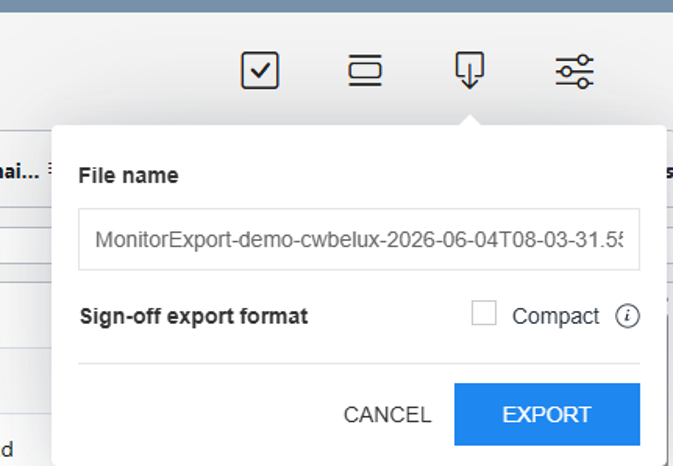
By ticking the “Compact” box, only the highest sign-off level will be displayed in Excel. In addition, as of today, it is possible to customise the name of the Excel file.
If you do not wish to use the compact export, you can still use the original export by simply clicking on “Export” and unchecking the box. This will display all sign-off statuses in the Excel cell, as well as the initials of the person signing off (only for standard Monitor columns) and the date on which the document was signed off.
Lux Fintax Settings
Entity Information
Financial Statements
eCDF Financial Statements
Tax
Financial Statements
Tax
Bug fixes
Entity information
Financial Statements
Tax
Bug fixes
(*) Note: if you have previously customized your template yourself at the firm level, it will not be overwritten. If you want to update these items in new engagements, you need to update your template with the latest version and publish it again from the Manage Template page in the Caseware Cloud settings.
If you have previously customized your template yourself at the firm level, it will not be overwritten. In this case, you can update your template with the latest version and publish it again from the Cloud menu > Settings > Lux FinTax > Manage Template. More information on Template management.
eCDF
Financial Statements
• Cover page: The “Amount of the share capital” can now be hidden in the View and print settings section in Entity information
• Management/Director’s report: Signatory fields for Managers/Directors will now appear at the bottom of the report when the checkbox is selected in the Corporate Bodies section in Entity information
• Date ranges are no longer displayed for balance sheet notes
• Minor layout improvements in tables within the Notes to the Financial Statements
Bug fixes
• Date of incorporation no longer deviates by a few days
• Date format corrected and improved in the Financial Assets note
• Orange warning message will not appear in the Tangible assets disclosure in Entity information when no balances are present
Tax
• Updated Exchange rates (average and year end 2025)
• Form 500 Corporate income tax section: correction label (R2021 changed to R2020)
• Form 900 improvement to prevent printing issue
General
French translations added for all documents except Legal Minutes and the Tax module. The language can be switched to French in the Engagement Properties window of the engagement file.
The ‘General’ phase has been moved to the bottom of the Documents page.
Optimiser checklist
Improved checklist logic and ordering
Entity information
Full revision of the Minutes’ content (Board and shareholders) and additional automation
Added new circular Minutes (Board and shareholders)
Workflow enhancements
Minutes checklist introduced to help tailor the scope
Separate Minutes phase added to the Documents page
Financial Statements
Cover page
Firm details moved lower on the page
Address format updated to the Luxembourg standard (Number + Street)
Table of Contents
Note titles are now included by default
Notes- General:
The title “Notes to the Annual accounts” now appears only on the first Notes page
Opening and closing balances are always displayed (in the printed PDF)
Prior-year dates in column headers now display immediately
Column widths adjusted in certain tables to improve presentation
Zero balances are displayed as ‘-‘ where applicable
Subscribed capital note
Share premium account note
Modified to a flexible table allowing manual addition of movement rows
Additional balance checks
Added to identify discrepancies are added for the following sections:
Balance sheet table (Assets=Capital check)
Profit or loss for the financial year (between BS and P&L)
Subscribed capital note
Other operating income note
Other external expenses note
Other operating expenses note
Bug fixes
Currency in the exported XML file is updated instantly.
Various minor bug fixes
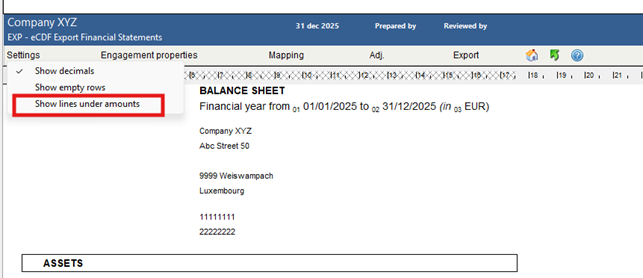
A new option has been added in the Document settings to control dot leaders in the Table of Contents. Dot leaders are now disabled by default, meaning they will no longer appear in the UI, print preview, or PDF output. If preferred, you can override this setting as this feature will be available for both new and existing engagements.
Page ranges are now enabled by default in the Table of Contents of your Financial Statements. For example, pages “5–6” will be displayed instead of just “5” when a section spans two or more pages. This setting can be managed in the Document settings and is available for both new and existing engagements.
Lux FinTax now automates the Form 900 that is needed for Luxembourg withholding tax on income from capital. This enhancement was developed in direct response to user feedback and makes the process faster and more reliable. Shareholder data flows directly from your Caseware tax file, so there is no need for retyping. Percentages are automatically applied based on the amounts you enter, while live on-screen checks flag any inconsistencies before submission. To use the feature, simply open Form 900, enter gross or net amounts (or paste them from Excel), review any warnings, and export to the official PDF output for filing.
This update does not include a new version of the template. All changes apply to both new and existing files.
 ] menu, making it easier to restore the initial content if needed.
This update does not include a new version of the template. All changes apply to both new and existing files.
This update does not include a new version of the template. All changes apply to both new and existing files.
Version Control is being provided in the platform to assist you complete reviews more efficiently. You can selectively save versions of a document, which can then be compared to highlight content changes that were made between versions.
This update does not include a new version of the template. All changes apply to both new and existing files.
To unify the data import and viewing experience, the Datasets page is now embedded in the Data page. The Import tab has been replaced by the new Datasets tab on the Data page. When you select to import data on the Datasets tab, the entire import process happens within that tab, instead of opening a new browser tab.
The Save views icon is now available on the Data page that allows you to save your current view and access previously saved views.
You can now view a dataset from the Datasets tab of the Data page. While previously, you could only view trial balance and general ledger in the Data page, you can now select the View data button for any dataset to view it.
You can now add custom calculations to text sections in the financial statements. Similarly to custom calculations in dynamic tables, you can reference trial balance values and dynamic table cells in your calculations. These calculations will update automatically if the referenced values change.
This release introduces cell referencing within the financial statements. You can now reference values from one dynamic table into another. This eliminates the need to manually enter the same value multiple times in different tables in the financial statements.
You can now add issues to dynamic table rows. The Issues icon displays when you hover your cursor over the right side of a dynamic table row. You can then select the icon to add an issue.
An All types dropdown is now available on the Adjustments page that allows you to filter adjustments by type. When you select to export adjustments, only the filtered adjustments are included in the generated file. This allows you to select only the types of adjustments you need and provide a copy of them to your clients.
An update has been made to the Copy account assignment option on the Assign accounts page. When you select a consolidation engagement to copy account assignment from, you can then select which engagement in the consolidation hierarchy you want to use as the source engagement. You can also select multiple grouping structures to copy from the source to the destination engagement.
Additional guidance is now available on the Assign Fields page when you are assigning date fields for data imported from Excel.
This update does not include a new version of the template. All changes apply to both new and existing files.
To allow you to more easily find financial groups, a search option is now available on the Financial groups tabs on the Data page.
You now have the ability to create calculated adjustments. When you add an account or group line to an adjustment, you now have the option to select fx in the Amount field and create a calculation to determine the adjustment amount. If the value of the referenced trial balance account or group is changed, a Recalculate button appears to recalculate and update the adjustment amount.
• Numbered headings for notes and text areas in the financial statements
The number of heading levels has been increased to five and you can now customize the numbering style of the headings. You can now also add headings with or without numbering to any text areas by selecting Numbered Heading Options from the Document settings in the financial statements.
• Modify financial group names
You can now modify the names of financial groups from the Data page.
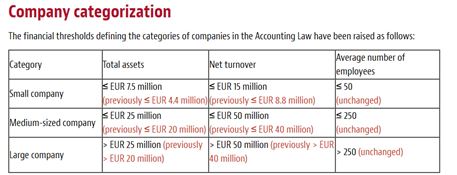
Important: V4 of the CaseWare Lux GAAP template can no longer be used to create engagement files with a year begin date in 2019 or older. All new engagement files will have PCN2020 included. Pre-existing engagement files will be prompted to convert the mapping when the year begin date is set to 2020 or later. We will make a blank PCN2009 engagement file available for download that can be used to create a PCN2009 engagement file while having this latest version installed.
