
To grant access to specific files or activities in an entity:
-
Ensure that you have the Owner role or equivalent rights to the files.
- Create a Contact User
- Ensure that the Contact user has access to the correct Apps to access the Engagement or Activity
-
Ensure that the users or groups have been granted the following roles only on the entity where the files belong:
-
Contact - Entity Access role for contacts or contact groups.
-
Entity Access role for staff or staff groups.
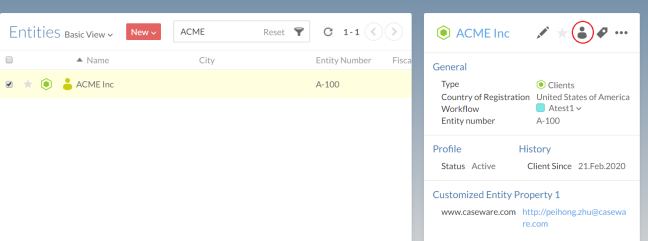
For example, if you want to grant staff member John Smith access to specific files in entity A, make sure that you select the Entity Access role for John Smith in the sharing properties of entity A.
The following figure shows the sharing properties icon.
-
-
From the Cloud menu (
 ), select the Product (Lux Audit, Lux Fintax, Smart Audit or Special Engagement) you wish to give access to.
If you want to grant access to an activity, select Activities.
-
Select the files or activities that you want to assign roles for, then select Share (
 ).
). -
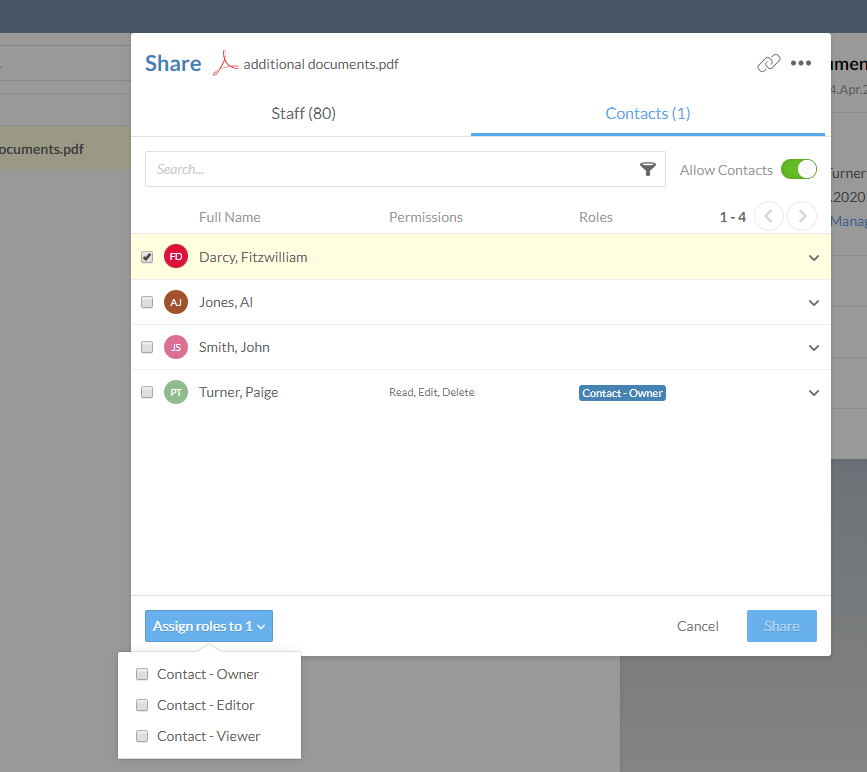
Select the users or groups you want to have access to the file or activity, then select Assign Roles to (#).
The list of roles that displays is different based on whether the selected users or groups are Staff or Contacts.
-
Select the check box next to the roles that you want to grant the users or groups.
-
Select Share.